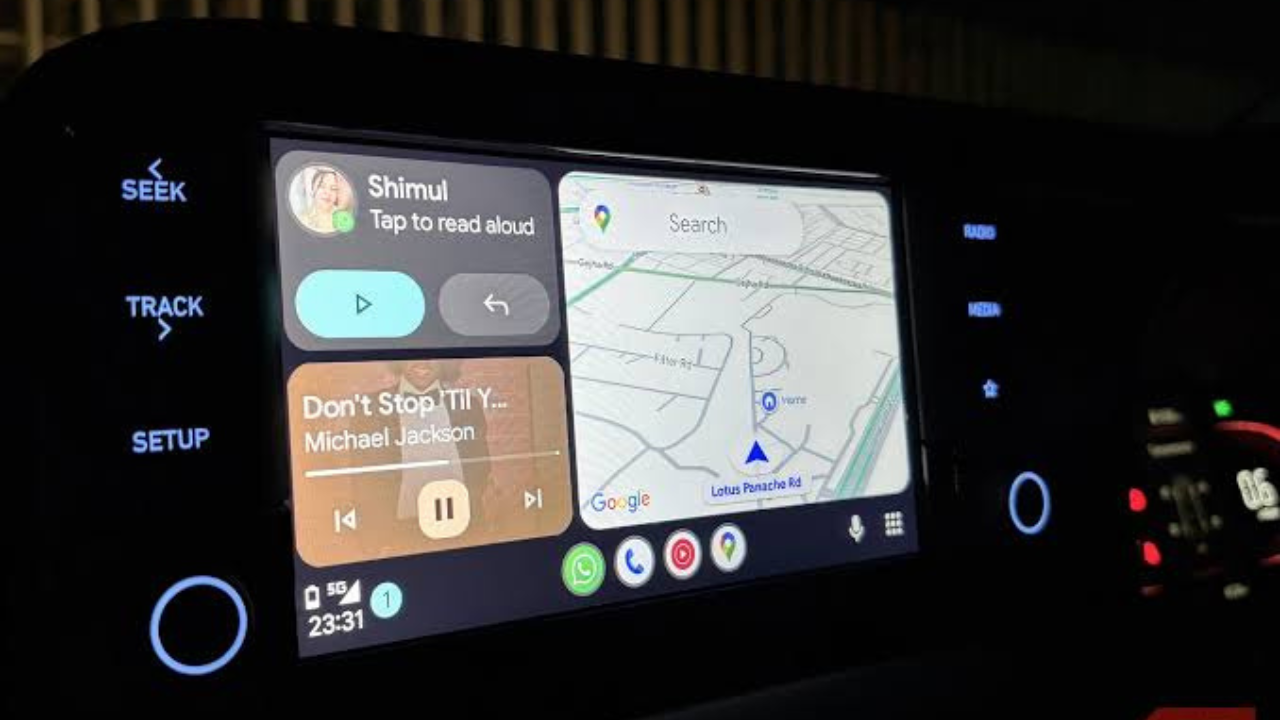
If your car has a screen but does not support Android Auto, you do not necessarily need to replace the entire stereo system. A small Android Auto adapter can sometimes add the feature for a relatively low cost, turning an existing display into a more useful system for navigation, music and calls.
For drivers who already have a compatible infotainment system, a low-cost adapter can be a much cheaper option than installing a new head unit. But there is an important catch: these adapters do not add Android Auto to every car.
The $20 workaround in simple terms
The basic idea is simple. Instead of replacing the car’s factory screen, you connect a small adapter to the car’s USB port.
The adapter communicates with the car’s infotainment system and creates an Android Auto connection. Your Android phone then connects to the adapter, allowing supported Android Auto apps and features to appear on the car’s screen.
The adapter itself does not replace the car’s display. It works as a bridge between the phone and the vehicle’s existing infotainment system.
This is why the method can be much cheaper than replacing the entire stereo.
The most important catch: compatibility
Before spending money on a cheap adapter, you need to check whether your car already supports the type of Android Auto connection the adapter requires.
This is the part that is easy to miss.
Many inexpensive wireless Android Auto adapters are designed to convert an existing wired Android Auto connection into a wireless one. They are not universal devices that add Android Auto to a car that never supported it.
In other words, if your car already has wired Android Auto, an adapter can often remove the need to plug your phone in every time.

If your car has no Android Auto support at all, a simple wireless adapter may not solve the problem.
How the setup normally works
For a compatible car, the process is usually straightforward.
You first plug the adapter into the USB port that the car normally uses for wired Android Auto. The car needs to recognize the adapter as an Android Auto connection.
Your phone then pairs with the adapter, normally using Bluetooth for the initial connection. After the setup is complete, the adapter can use a wireless connection between the phone and the car.
The general process looks like this:
- Plug the adapter into the car’s Android Auto USB port.
- Pair the Android phone with the adapter.
- Allow the required Android Auto permissions on the phone.
- Wait for Android Auto to appear on the car’s display.
Once everything is working, you can normally leave the adapter connected to the car and let your phone connect automatically when you start driving.
What you can do with Android Auto
Android Auto brings selected phone features to the vehicle’s screen in a driving-friendly format.
Navigation is one of the biggest reasons people use it. You can use supported navigation apps to get directions without holding the phone.
You can also access supported music and audio apps, make calls and send or hear messages using voice controls.
The idea is to keep your attention on the road rather than repeatedly reaching for your phone.

Android Auto does not mirror everything on your phone. Google limits the apps and features that can appear on the car screen to those designed or approved for use while driving.
Why a cheap adapter can be appealing
A small adapter can solve a very specific problem without requiring major changes to the car.
If your vehicle already supports wired Android Auto, the adapter can make the experience more convenient by removing the cable. You can keep your phone in your pocket or on a charging pad instead of connecting a USB cable every time.
The low price also makes the experiment relatively inexpensive compared with replacing a factory infotainment system.
For an older car with a perfectly good screen and stereo, this can be a practical upgrade.
What a $20 adapter cannot do
The biggest misunderstanding is expecting a cheap wireless adapter to magically add Android Auto to any vehicle.
That is not how most of these products work.
If your car has an old infotainment system that supports only Bluetooth audio, for example, plugging in a wireless Android Auto adapter will not necessarily give you Android Auto.
The adapter needs the car’s infotainment system to provide the underlying connection it was designed to use.
There are other products that advertise adding Android Auto to older vehicles, but those are different from simple wireless adapters and can cost considerably more.
Wireless Android Auto is not the same as wired Android Auto
Wireless Android Auto is mainly about convenience.
With a wired connection, your phone sends the Android Auto experience through the USB cable. The phone may also charge at the same time.
With a wireless adapter, the phone connects to the adapter without the USB cable between the phone and the adapter. The adapter remains connected to the vehicle.
The trade-off is that wireless connections can introduce another point where things can go wrong. Pairing problems, connection drops and delayed startup can happen with some adapters.
A wired connection is generally simpler when reliability matters most.
What about charging?
One of the biggest downsides of going wireless is that the phone may no longer charge through the Android Auto cable.
If your car has a wireless charging pad, that can solve the problem. Otherwise, you may need a separate charging cable.
This is worth considering because navigation, music streaming and mobile data can use a noticeable amount of battery during a long drive.
A wireless Android Auto adapter makes the connection easier, but it does not remove the need to keep your phone charged.
Is the cheap workaround safe?
The adapter itself should not be treated as a replacement for the car’s safety systems.
Android Auto is designed to reduce the need to interact directly with the phone while driving, but drivers still need to keep their attention on the road.
It is also important to buy an adapter from a reputable seller. Very cheap unknown devices may have poor software support, unreliable connections or unclear privacy practices.
The lowest price is not always the best deal if the device repeatedly disconnects or requires complicated troubleshooting.
When this workaround makes sense
A cheap wireless adapter makes the most sense when your car already has wired Android Auto and you simply want to get rid of the cable.
It can also be useful for families who regularly switch between phones. Once the adapter is configured, multiple compatible phones may be able to connect, although the exact behavior depends on the adapter and vehicle.
The workaround is less attractive if your car does not support Android Auto in the first place. In that situation, you should look for a product specifically designed to add Android Auto to your vehicle rather than buying a basic wireless adapter.
Before you buy one
Check your car’s infotainment system first.
Look for Android Auto support in the vehicle’s manual or infotainment settings. If Android Auto works when you connect an Android phone with a USB cable, you are in a much better position to use a wireless adapter.
Also check the phone requirements listed by the adapter manufacturer. Android Auto compatibility can depend on the phone, Android version, vehicle and adapter software.
A few minutes of checking can save you from buying a device that your car cannot use.

Final verdict
A roughly $20 Android Auto adapter can be a clever workaround, but only when used for the job it was designed to do.
If your car already supports wired Android Auto, a small wireless adapter can turn that wired connection into a more convenient wireless setup without replacing the factory screen or stereo.
If your car has no Android Auto support, however, a basic wireless adapter is unlikely to magically add the feature.
So before spending the money, check one thing first: Does your car already support wired Android Auto? If the answer is yes, the inexpensive adapter route can be one of the simplest ways to make an older infotainment system feel much more modern.