
 Join WhatsApp
Moving from an iPhone to a new Android phone has often meant spending time moving photos, messages, contacts, apps and other personal information. Samsung is now trying to make that first step much easier with the Galaxy Z Fold8.
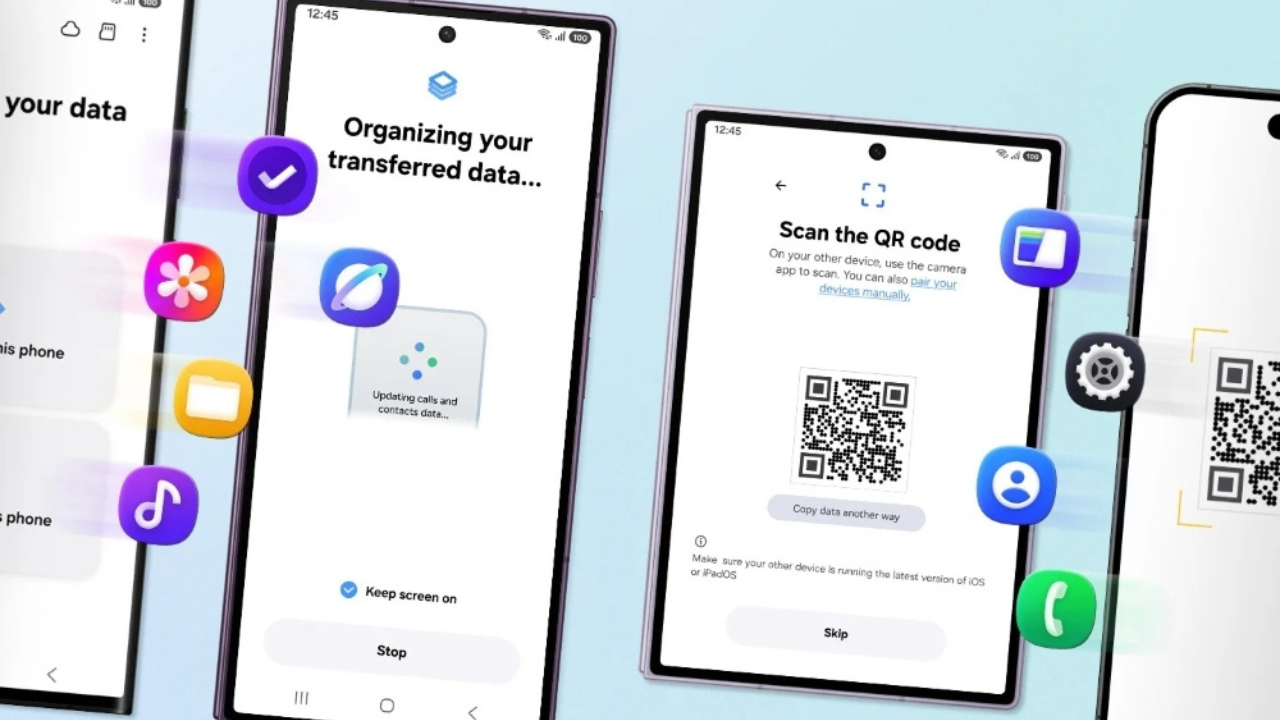
The company has upgraded Smart Switch in One UI 9 so iPhone users can begin the transfer with a QR code and move more types of personal data wirelessly. The new system is designed to make switching to Galaxy less time-consuming and reduce the need for cables, adapters and manual setup.
Switching From iPhone Starts With a QR Code
The biggest change is how the transfer begins. With the new Smart Switch experience, users setting up a Galaxy Z Fold8 can scan a QR code shown on the Galaxy device with their iPhone.
There is no need to separately install the Smart Switch app on the iPhone for this upgraded transfer method. The two phones can connect wirelessly, allowing users to choose what they want to move to the new Galaxy device.
This is useful because moving to a different phone system can otherwise require several separate steps. Samsung’s updated process puts more of those tasks into one setup flow.

More Personal Data Can Move to the Galaxy Z Fold8
Samsung has also expanded the types of information that can be transferred from an iPhone. The list includes common items such as photos and contacts, but the newer system can also handle several types of information that are easy to forget when changing phones.
The upgraded Smart Switch can transfer:
- Photos and videos, messages, contacts and calendars
- Apps, music, notes, files and voice recordings
- Passwords and passkeys, where supported
- Call history, accessibility settings and eSIM information
The exact data that can be transferred depends on the operating systems and the type of connection being used. Samsung says the upgraded iOS-to-Galaxy method requires the Galaxy device to run Android 17 or later with One UI 9 or later, while the iPhone or iPad needs iOS 26.6 or later. Availability can also vary by region.
Your Home Screen Can Come With You
Changing phones can be frustrating even after the main data has been moved. Users may still have to download apps again, arrange icons and rebuild the way they normally use their phone.
Samsung’s updated Smart Switch can also move favorite apps and the home screen layout. This means the new Galaxy can be set up in a way that feels closer to the previous phone instead of starting completely from scratch.

For people coming from an iPhone, this can make the first few minutes with a Galaxy device less confusing. The goal is not to make Android identical to iOS, but to reduce the amount of work needed before the phone feels ready.
The New Transfer Process at a Glance
| Feature | New Smart Switch experience |
|---|---|
| Start transfer | Scan a QR code shown on the Galaxy |
| Connection | Wireless transfer |
| Separate Smart Switch app on iPhone | Not required for the upgraded method |
| Photos and videos | Supported |
| Messages and contacts | Supported |
| Passwords and passkeys | Supported where available |
| Call history | Supported |
| eSIM information | Supported |
| Home screen layout | Supported |
| Required Galaxy software | Android 17 or later and One UI 9 or later |
| Required iPhone software | iOS 26.6 or later |
The requirements are important because older devices and software versions may not support every part of the new transfer system.
Quick Share Also Makes Cross-Platform Sharing Easier
The changes are not limited to the initial move. Samsung has also updated Quick Share, its file-sharing feature, to improve sharing between Galaxy and other devices.
On supported Galaxy devices running One UI 9 and One UI 8.5, Samsung says Quick Share can work with iOS devices through AirDrop compatibility. This means moving to Galaxy does not necessarily mean giving up the ability to share files easily with friends or family who use iPhones.
Samsung says this cross-platform sharing support is currently available first on selected devices, including the Galaxy Z Fold8, Galaxy Z Fold8 Ultra, Galaxy Z Flip8 and Galaxy S26, with plans to expand support later.

Galaxy Z Fold8 Is Built Around One UI 9
The easier switching experience is part of the software that comes with Samsung’s newest foldable phones. The Galaxy Z Fold8 runs One UI 9, which also brings other ways to customize the phone.
Users can change settings such as swipe gestures and the home screen layout. Samsung’s Good Lock customization tools provide additional options for changing parts of the interface and the way apps are used.
That matters for people coming from another phone platform because they can adjust the Galaxy’s controls to better match the way they prefer to use a phone.
What This Means for iPhone Users
The biggest benefit is simple: Samsung is removing some of the work involved in switching platforms.
Previously, a person moving from an iPhone to a Galaxy phone could face several separate tasks after buying the new device. The updated Smart Switch process brings more of those tasks together and lets users begin with a QR code rather than looking for a cable or installing another app on the iPhone.

It also goes beyond basic contacts and photos. The ability to bring over information such as passwords, passkeys, call history, accessibility settings and eSIM details can save time during setup.
For anyone considering the Galaxy Z Fold8 but worried about leaving an iPhone behind, this makes the change much less complicated.
A Smaller Barrier to Switching Phones
The Galaxy Z Fold8’s foldable screen and hardware may attract most of the attention, but Samsung’s latest Smart Switch changes address a much more basic problem: getting started with a new phone.
By using a QR code, wireless transfer and support for more types of data, Samsung is making it easier for iPhone users to bring more of their existing setup to Galaxy. The company is also working to make sharing between Galaxy and iPhone users easier after the switch.
The process does not make every part of moving between iOS and Android automatic, and some data depends on the devices, software versions and region. Still, the upgraded Smart Switch removes several steps that could make people hesitate before changing phones.

For new Galaxy Z Fold8 owners, that means the first day with the phone can start with less manual setup and more of the information they already use.